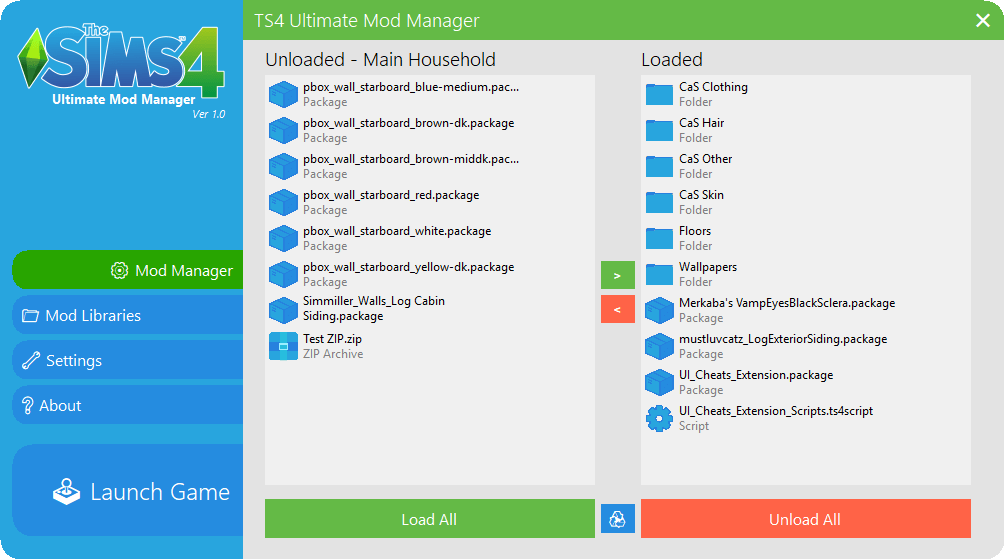
Automatic updates! The application will now tell you on launch if there is a new version available. This can be turned off in the settings.
Bugfix: Clicking load all will no longer crash the application when there is an identically named file already loaded (and vice versa, of course).
Bugfix: Window titles have proper names now.
Larger updates are coming soon. I’m currently working on an embedded file browser and setting up the groundwork for localisation down the line. A reader for log files is also being worked on. Hopefully the application will let you know when the next version is ready to download!
Features:
- Switch between and manage multiple libraries on the fly
- Create, rename and delete libraries within the application
- User friendly design
- Load/Unload multiple mods at once with multi select
- Drag and drop files onto the load/unload list to send them to the respective directories (even works from within WinRAR)
- Auto detect and identify different sorts of CC
- Option to automatically unload mods on game exit
- Multiple view styles for your mod lists
Basic Controls for Playstation
Rescuing My Sixty Gigabyte Mods Folder from Absolute Chaos
Let’s be completely honest with ourselves: keeping an organized Mods folder in The Sims 4 is a fantasy that most of us abandon after the first month of custom content addiction. It starts innocently with five cute hairstyles and a cozy sweater. Fast forward two years, and your folder has ballooned into a terrifying sixty-gigabyte labyrinth containing thousands of files with unhelpful names like xf_mesh_349_final.package or random creator codes. That digital chaos was slowly eating my computer storage until I downloaded the Ultimate Mod Manager.
Instead of manually digging through endless nested folders and squinting at cryptic file names, this standalone utility scans your entire directory and presents everything in a sleek, searchable visual catalog. You can see file types, creator tags, and direct thumbnail previews, turning a chaotic digital junk drawer into a tidy, organized library.
Toggling Risky Mods Before My Younger Sibling Plays
One of the most practical everyday lifesavers offered by the manager is the one-click profile toggle feature. Many simmers enjoy mature storytelling mods, adult animations, or gritty violence systems when playing their private saves. But if you share your computer with younger siblings or family members who want to build cute horse ranches, having those adult files active is a recipe for disaster.
With this utility, you can create separate mod profiles with dedicated checkboxes. Before my younger cousin hops on my computer for the weekend, I click one button to disable adult mods, leaving only wholesome furniture and family-friendly clothing active. When she finishes, I switch back to my main profile in two seconds flat, with zero risk of awkward family moments or scrambled save files.
Visual Thumbnail Previews for Ruthless Wardrobe Purges
We all download clothing CC late at night that looked stunning on a creator’s edited photoshoot, only to realize in-game that the mesh clips through shoulders or looks bizarre on normal Sim bodies. Finding that specific bad package inside a giant folder used to feel impossible.
With this tool’s visual thumbnail viewer, you can browse 3D and 2D renders of your installed clothes, hairstyles, and furniture outside the game. I sat down with a cup of tea, scrolled through my custom hairs, spotted four outdated meshes that never looked right, and deleted them directly from the app interface. It makes seasonal wardrobe spring-cleaning fast, visual, and remarkably satisfying.
Ending the Agony of the Manual Fifty-Fifty Troubleshooting Method
Anyone who has spent a miserable Friday evening performing the grueling 50/50 method after a major patch broke the game knows true simmer despair. You take half your mods out, load the game, test the UI, exit, swap halves, and repeat the tedious cycle for four agonizing hours while your dinner gets cold on the desk.
The manager cuts troubleshooting time in half. You can batch-disable specific mod categories—like UI overrides, script mods, or script traits—right from the interface without moving heavy files back and forth between desktop folders. Pinpointing which specific package is causing glitches takes fifteen minutes instead of an entire evening, giving you back precious hours to actually play your game.
Hunting Down Duplicate Package Files Eating My Hard Drive
Another silent killer of game performance is duplicate downloads. When you download lots or lookbooks from various creator posts, you inevitably download the same shoe or hairstyle package three times under slightly different filenames. Those duplicate packages eat up precious hard drive space and slow down lot loading times.
The manager’s duplicate scanner scans package hashes, instantly flagging identical files regardless of what they are named. Running the scanner on my bloated directory freed up nearly eight gigabytes of redundant files in a single click. My game loaded noticeably faster on the very next boot, and my computer fans finally stopped screaming like an airplane taking off.
The manager also includes a convenient mod notes section where you can type personal reminders for complex mods. I jotted down installation notes for custom lighting overrides, keybindings for camera tools, and links to creator Patreon pages. Having your personal mod notes stored right alongside your files turns mod management from a chaotic guessing game into an organized hobby.
Preparing Your Game for Patch Day Panic in Five Minutes
Patch day in The Sims community is notorious for broken user interfaces, stuck loading screens, and panicky forum posts. Having a dedicated management program makes updating painless. You can quickly disable all script files with a single toggle, test the vanilla patch features, and re-enable mods one by one as creators release their hotfixes.
It pairs brilliantly with asset checking from our Tray Importer guide and core script coordination from XML Injector SCUMBUMBO. If your mods directory is on the brink of collapse, this manager will restore order and peace of mind to your gaming life.