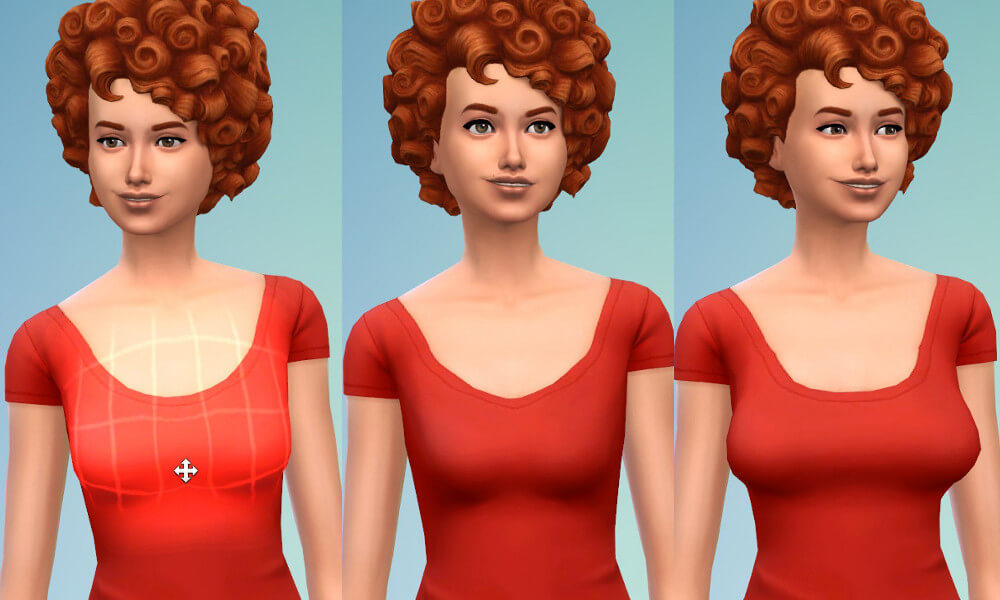
Create-A-Sim in The Sims 4 offers players extraordinary freedom to sculpt unique characters through its intuitive click-and-drag interface. However, while the game includes basic sliders for bust size and vertical lift, body customization enthusiasts frequently encounter limitations when trying to refine subtle torso anatomy. In the vanilla game, Sims with larger busts often display an unnaturally merged silhouette where breasts appear pressed together without realistic spacing. CmarNYC’s Breast Separation Slider solves this anatomical shortcoming.
By replacing the front-view horizontal drag mechanic with a custom separation morph, this slider allows players to fine-tune bust spacing, ribcage contours, and torso proportions. This review evaluates the slider mechanics, anatomical realism, clothing mesh compatibility, and installation essentials of CmarNYC’s celebrated CAS modification.
Refining Torso Contours with Anatomical Precision
The primary purpose of the Breast Separation Slider is to provide nuanced control over chest anatomy that default game presets do not offer. In vanilla CAS, dragging the chest horizontally from the front view simply scales overall bust width. CmarNYC modified this morph target so that moving the mouse horizontally adjusts the physical separation distance between breasts instead.
Dragging inward creates a closer, pushed-together cleavage appearance suitable for structured corsets or supportive athletic wear. Dragging outward spreads the breasts further apart along the ribcage, producing a relaxed, natural silhouette that looks authentic for casual and unpadded clothing.
This subtle adjustment dramatically improves body diversity in your worlds. Rather than all Sims sharing identical chest spacing dictated by base presets, each Sim can possess distinct torso proportions that reflect natural biological variation across different body types.
Maintaining Full Control Over Bust Size and Profile Shaping
A frequent concern with custom CAS sliders is whether modifying one axis removes control over standard body shaping. CmarNYC thoughtfully engineered the slider so players retain full control over bust size and side-profile projection without compromise.
While the front view controls horizontal separation, rotating the Sim to a side-profile view allows you to adjust overall breast volume, projection, and vertical tilt using standard EA drag handles. This means you can create a wide variety of body shapes—from petite athletic figures with wide sternum spacing to fuller silhouettes with subtle, natural cleavage—with total creative freedom.
The morph operates smoothly across the entire weight and fitness spectrum. Whether your Sim is slender, muscular, or curvy, the slider adjusts ribcage vertices proportionally without introducing harsh angles or unnatural torso flattening.
Enhancing Lingerie, Swimwear, and Formalwear Visuals
The visual benefits of fine-tuning chest separation become particularly noticeable when dressing Sims in specialized wardrobe categories. In unpadded swimwear, bikini tops, and casual lingerie, natural breast separation creates a relaxed, authentic anatomical silhouette that looks organic rather than molded from plastic.
Similarly, for formal evening wear featuring plunging necklines, sweetheart bodices, or backless designs, adjusting the separation distance ensures that fabric straps rest naturally against the ribcage. Sims wearing high-fashion gowns achieve balanced proportions that complement sophisticated styling without harsh visual seams.
Compatibility with Custom Skins, Overlays, and Body Presets
For simmers who use custom skin overlays and realistic anatomical details, CmarNYC’s slider interacts harmoniously with high-resolution textures. Because the slider modifies underlying bone geometry rather than skin textures, custom body shadows, collarbone highlights, and chest contours stretch and shift naturally with the morph.
It also functions alongside custom body presets, allowing players to establish unique silhouettes before applying fine-tuned anatomical spacing adjustments. This versatility makes the slider an essential building block in creating diverse, realistic characters across all worlds.
Clothing Mesh Compatibility and Distortion Considerations
Because The Sims 4 relies on vertex morph maps to fit clothing over Sim bodies, custom sliders interact differently with various clothing meshes. CmarNYC’s slider performs exceptionally well across the vast majority of base game garments, custom content swimsuits, and casual tops.
However, players should be aware of clothing behavior at extreme slider values. When pushing the separation slider to its outermost limits, certain tightly textured tops, deep V-neck dresses, or rigid shoulder straps may experience minor texture stretching or slight collar distortion. This is a normal characteristic of the game’s vertex deformation engine rather than a fault of the slider itself.
For everyday gameplay, moderate adjustments provide completely natural results across both feminine and masculine clothing pieces. It pairs beautifully with beachwear CC like Karlee Pool Accessories and playful pose sets like Kitty Kitty Poses.
The slider works equally well on both masculine and feminine torso frames, allowing character artists to sculpt diverse physiques across all genders. Subtly widening or narrowing the sternum area enhances realism across broad muscular figures as well as delicate slender builds.
For players who spend extensive time capturing storytelling portraits, having granular control over chest anatomy ensures that characters look natural from every perspective during active gameplay animations.
Conflict Checks and CAS Slider Management
Because this mod modifies the front-view chest morph target, it will conflict with other custom sliders that attempt to override the exact same front-chest bone handles. Players should check their Mods folders for conflicting breast sliders before installing to ensure smooth operation.
The slider does not conflict with waist, hip, or shoulder sliders, allowing you to combine it freely with broader body sculpting packages. Additionally, because it functions purely through package-based morph resource replacements, no external script files are needed, making the mod immune to breaking after standard patch updates.
Installation Guide and Final Player Impressions
Installing the Breast Separation Slider is completely effortless. Download the package file from Mod The Sims and drop it directly into your Mods folder. There is no complex setup required; the next time you launch Create-A-Sim, the front-view drag behavior will function automatically.
For players who value realistic character creation, refined anatomical detail, and genuine body diversity, CmarNYC’s Breast Separation Slider is a subtle yet essential customization mod that elevates Create-A-Sim styling to a higher standard of realism.