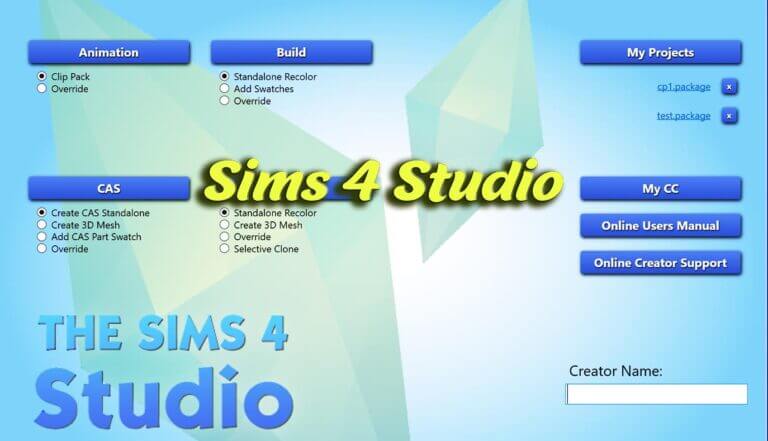
The vibrant custom content and modding community is the lifeblood of The Sims 4, providing millions of players with fresh hairstyles, fashionable outfits, unique furniture, and innovative gameplay systems. However, behind every piece of custom content sits a specialized development pipeline. For creators, recolor artists, and mod enthusiasts, no software is more essential, versatile, or foundational than Sims 4 Studio (S4S).
Developed and maintained by the dedicated S4S development team, Sims 4 Studio for Windows is a comprehensive, free tool that empowers players to create, edit, repair, and manage custom content. This review breaks down what Sims 4 Studio does, its primary features, batch-fixing capabilities, and why it is an indispensable utility for creators and casual players alike.
Empowering Creators with Effortless CAS and Object Recolor Tools
For simmers interested in learning custom content creation, Sims 4 Studio provides the ideal entry point. The software features an intuitive graphical user interface that allows creators to clone official EA assets—including clothing, hairstyles, makeup, shoes, and furniture objects—with a single click.
Once an asset is cloned, creators can export texture diffuse maps, normal maps, and specular masks directly into image editors like Photoshop or GIMP. After adding custom colors, patterns, or fabric designs, re-importing textures back into S4S takes only seconds. The built-in real-time 3D viewport renders the model instantly, allowing you to rotate, zoom, and inspect your custom texture changes in 3D space before testing them in the actual game.
This efficient workflow democratizes CC creation, allowing beginners to produce professional recolors without needing complex programming knowledge or advanced 3D modeling skills.
Managing Swatches, Color Palettes, and Catalog Tags
One of the most practical everyday features in Sims 4 Studio is its robust catalog tag and color swatch manager. When creators craft new clothing or furniture, S4S makes it simple to assign accurate color tags, fashion subcategories, and age-gender availability flags with straightforward check boxes.
Creators can arrange swatches into harmonious color wheels, add custom palette thumbnails, and set proper price values. S4S also lets you toggle formal, athletic, or party outfit categories, ensuring that custom clothing appears in appropriate live-mode outfits and avoiding odd styling combinations during everyday gameplay.
Creating Custom Wallpapers, Flooring, and Build Catalog CC
Architectural builders also benefit immensely from Sims 4 Studio’s build-mode asset tools. The software enables players to create custom wallpapers, exterior siding, stone masonry, and hardwood flooring with seamless repeating patterns.
By importing custom bump maps and specular lighting textures, builders can make brick walls appear tactile and give glossy tile floors realistic light reflections under sunlight. This allows interior designers to recreate authentic historical plaster, modern industrial concrete, or cozy rustic paneling that base game catalogs lack.
3D Mesh Editing, Blender Integration, and Warehouse Mode
Beyond simple recolors, Sims 4 Studio is a powerhouse for advanced 3D artists. The program integrates directly with Blender, the popular open-source 3D modeling suite. When creating new clothing meshes or architectural objects, S4S automatically exports formatted blend files containing proper vertex groups, bone rigs, and morph data.
After adjusting meshes in Blender, re-importing the model back into S4S updates all Level of Detail (LOD) stages cleanly. The software handles bone weighting, shadow meshes, and vertex color assignment, ensuring that custom clothes deform naturally with Sim body sliders in live gameplay.
For technical modders, S4S features Warehouse Mode—a powerful internal editor that exposes raw XML tuning files, image resource tables, string tables for translations, and binary footprints. This gives creators complete granular control over every aspect of an asset’s data structure, making it possible to design intricate functional objects and lighting props.
Automated Batch Fixes and Mod Library Maintenance
Even if you never create custom content yourself, Sims 4 Studio is an invaluable maintenance utility for casual players with large Mods folders. Whenever EA releases major expansion packs or patch updates, older custom content frequently breaks, causing symptoms like black texture glitches, missing skin tones, or broken bath and shower animations.
Sims 4 Studio includes an automated Batch Fix feature that scans your entire Mods folder and repairs thousands of broken CC items in minutes. With a few clicks, you can run batch fixes to make older CC compatible with newer game patches, update chairs for counter placement, fix pet interactions, or disable CC for random townie generation so NPCs do not spawn in bizarre outfits.
This automated maintenance saves players dozens of hours of manual file troubleshooting, keeping mod collections running cleanly across years of game updates. It pairs excellently with tuning mods like Simulation Lag Fix and building unlockers like BuildBuyMode Unlocker.
The built-in package merger and unmerger utilities allow players to consolidate hundreds of individual CC files into unified packages, drastically cutting down initial game loading times. Conversely, creators can unmerge combined files whenever they need to edit a specific item, maintaining full control over file structures.
Comprehensive error logging alerts modders to missing vertex weights or unassigned textures before launching the game, preventing unexpected graphical glitches.
System Requirements, Windows Installation, and Community Support
Sims 4 Studio for Windows (currently released under the “Wishes” edition) is completely free to download from the official Sims 4 Studio community forums. Users must register a free account to access download links and view hundreds of comprehensive beginner tutorials written by experienced creators.
The program runs smoothly on standard Windows 10 and Windows 11 computers. During initial setup, simply direct the software to your Sims 4 installation folder and your Documents/Sims 4 directory, and S4S will index your game catalogs automatically. The active community forum provides supportive assistance, helping aspiring creators troubleshoot mesh rigging or texture mapping issues.
Whether you dream of publishing your own custom clothing lines or simply want to keep your massive CC folder organized and glitch-free, Sims 4 Studio for Windows is an indispensable tool that every serious simmer should have installed.