Instant Fashion Inspection and the Online Studio CAS Viewer
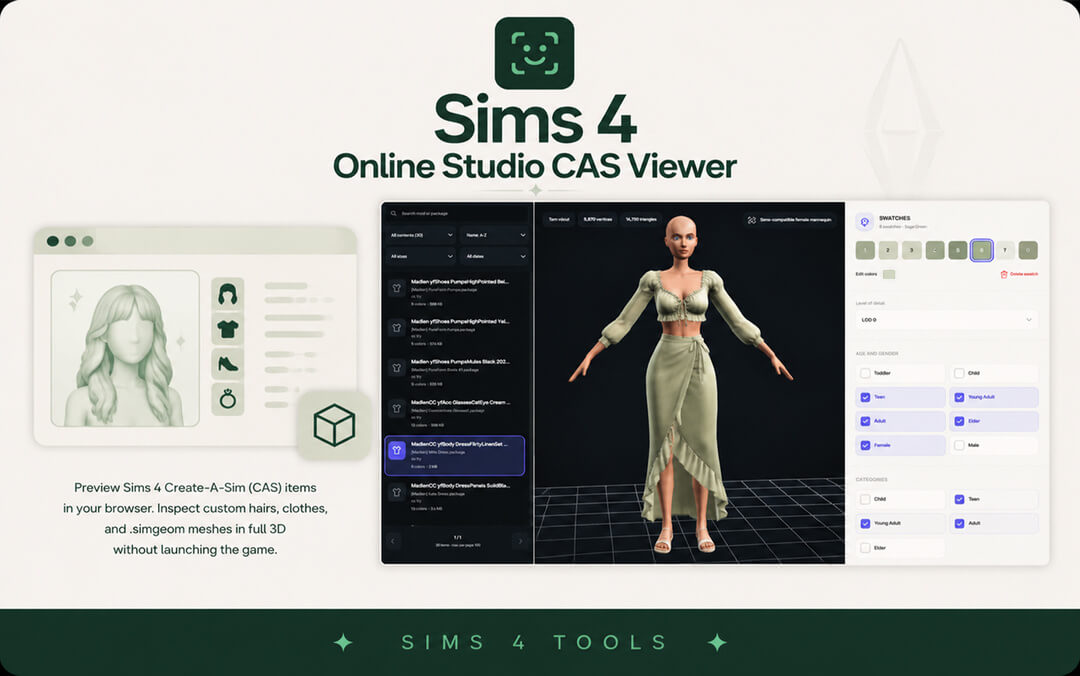
Every Sims 4 player knows the exhausting routine of downloading dozens of new custom clothing items, launching the game, waiting for Create a Sim to load, and discovering that a custom hairstyle clips through character shoulders or an outfit has distorted diffuse textures. The Sims 4 Online Studio CAS Viewer by Simsmodly puts an end to this frustrating cycle by bringing full 3D Create a Sim inspection directly into your web browser, eliminating the need to launch the game or install heavy desktop applications.
The tool is designed for fashion enthusiasts, character stylists, custom content creators, and CC hoarders who want immediate visual confirmation of how clothing, hair, shoes, and accessories render in 3D space. By leveraging modern client-side web technologies, the tool parses package files instantly, presenting fully textured 3D models with responsive camera controls.
Simmers can drag and drop any CAS package file into the browser, immediately unlocking an interactive 3D model that can be rotated, zoomed, and examined under customizable lighting environments.
Full 3D mesh rendering, swatch switching, and texture analysis
The core rendering engine of the CAS Viewer displays custom content with impressive graphical fidelity. The interactive 3D viewport supports 360-degree rotation, vertical pan, and extreme close-up zoom, allowing users to examine subtle fabric seams, lace edges, and hair strand sculpts.
Users can cycle through all embedded swatches within the package with a single click. The tool swaps diffuse textures in real time, making it effortless to review complete color palettes for garments and hairstyles without delay.
The interface provides customizable background environments, allowing stylists to view garments against clean studio backdrops or simulated in-game lighting. This flexibility ensures that subtle fabric textures, lace patterns, and leather sheen can be evaluated under optimal visibility before entering your active save file.
The viewer also exposes dedicated texture map channels, allowing creators to isolate normal maps, specular shine maps, shadow maps, and alpha transparency channels. This makes diagnosing transparency sorting glitches and specular shine bugs straightforward and intuitive.
Polygon counter, LOD tier inspection, and bone assignment review
A crucial feature of the Online Studio CAS Viewer is its comprehensive technical data display. The tool reports exact polygon counts and vertex density across all four Level of Detail tiers (LOD0 through LOD3), empowering players to catch excessively heavy meshes before they burden system memory.
The tool also highlights texture map resolutions and file sizes directly in the dashboard. Identifying oversized textures that consume unnecessary graphic memory allows players to keep their game running smoothly, preventing stuttering during large family events or busy community gatherings.
Users can also inspect bone assignments and vertex weighting boundaries. This allows creators and curious simmers to see how clothing will deform around character joints like elbows, knees, and hips during active live gameplay.
The tool supports a wide array of CAS item categories, including tops, bottoms, full-body dresses, hairstyles, hats, shoes, jewelry, and skin details.
Client-Side Performance, Total Privacy, and Local File Safety
A major advantage of the Simsmodly web platform is its strict adherence to user privacy and performance optimization. The entire parsing and rendering process occurs locally on your machine using modern WebGL and WebAssembly frameworks.
No software installations and zero server uploads
Your custom content package files are never uploaded to remote servers or cloud storage; all data processing occurs safely inside your local web browser. This ensures complete file security and instant response times, regardless of your internet connection speed.
Because no heavy desktop software is required, the tool runs effortlessly across Windows, macOS, Chromebooks, and Linux. You can leave the browser tab open while downloading custom content from community creators, inspecting each piece the moment it finishes downloading.
Because the viewer is accessible from any web browser without installation, you can even use it on mobile devices or secondary laptops to preview custom content while downloading files, making CC hunting faster and more productive than ever before.
Pairing this viewer with popular custom content like the Daniella Skirt allows you to inspect fitted tailoring, specular shine, and color swatch variations before adding files to your active game.
Mods Folder Organization and Creator Quality Assurance
For custom content organizers, the CAS Viewer is an indispensable asset for folder maintenance. When sorting through unsorted download folders or tracking down broken items that cause visual glitches, dropping files into the viewer reveals the exact 3D model in seconds.
Fashion creators will find the tool indispensable for rapid prototyping. Instead of exporting packages and waiting through game loads to check diffuse shading, designers can verify seam alignment, normal map depth, and alpha transparency directly in the browser within seconds of saving their files.
You can quickly identify duplicate items, verify mesh dependencies, and purge unwanted swatches without risking corrupt saves or enduring long boot sequences.
Custom content creators can use the viewer to capture clean 3D preview renders against neutral backgrounds for download posts, social media showcases, and catalog thumbnails.
Browser Innovation and Final CAS Tool Verdict
The Sims 4 Online Studio CAS Viewer is a revolutionary web utility that transforms how players inspect, organize, and create character fashion for The Sims 4. By delivering instant 3D rendering, swatch cycling, and detailed polygon metrics directly in the browser, it saves players countless hours of tedious game loading.
By eliminating the barrier of slow game boot times, this browser-based utility empowers simmers to maintain immaculate, high-performance custom fashion collections with minimal effort.
Whether curating casual street wardrobes or high-fashion formal collections, the CAS Viewer delivers unprecedented clarity, control, and peace of mind for every fashion enthusiast.
Whether you are a passionate custom content creator verifying texture maps, a dedicated stylist organizing massive fashion libraries, or an everyday simmer looking to keep your Mods folder clean and stable, this web tool provides unmatched speed, clarity, and dependable utility in every session.