Streamlined CC Inspection and the Online Studio Build Buy Viewer
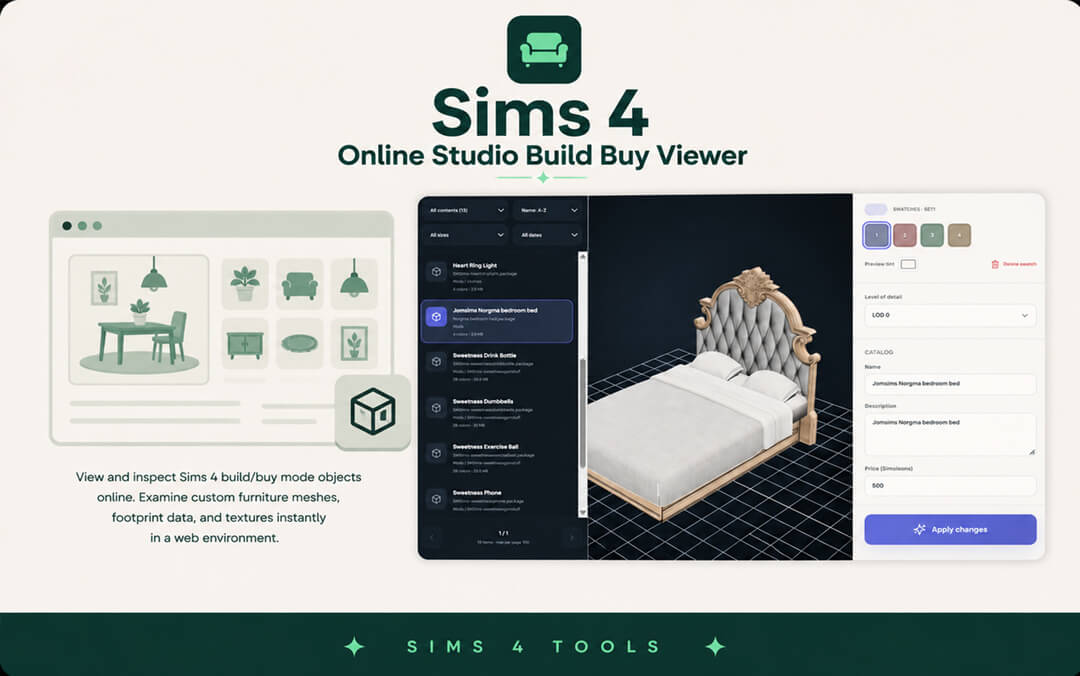
Managing extensive custom content collections in The Sims 4 has always been an exhausting trial of patience. Veteran builders know the frustration: downloading a promising furniture pack, waiting ten minutes for the game to boot up, loading into a massive lot, and discovering that a custom sofa has broken normal maps or floating shadow footprints. The Sims 4 Online Studio Build Buy Viewer by Simsmodly completely eliminates this bottleneck by offering a fully responsive, web-based 3D inspection environment directly in your browser.
The tool is designed for builders, custom content creators, and clutter enthusiasts who want instant visual feedback on their packages without installing heavy desktop utilities or enduring agonizing game loading screens. Operating completely client-side in modern web browsers, the tool delivers real-time 3D rendering, mesh analysis, and texture inspection with zero software downloads required.
Simmers can simply drag and drop package files into their browser window, instantly unlocking a full interactive 3D model that can be rotated, zoomed, and examined under varied virtual lighting angles.
Instant 3D rendering, mesh rotation, and texture inspection
The core engine of the Build Buy Viewer renders custom furniture, clutter, and architectural objects with high visual fidelity. The web viewport allows full 360-degree orbital rotation, pan controls, and macro zoom, allowing you to examine fine details like wood grains, fabric weaves, and metal bevels.
Users can cycle through all embedded swatches within a package file in real time. Rather than guessing how a dining chair will look in walnut versus oak, the tool displays diffuse texture swaps instantaneously with a single mouse click.
The viewer includes intuitive lighting toggles that allow users to simulate different environment conditions. You can switch between neutral studio lighting, warm indoor lamplight, and crisp outdoor sunlight to observe how object materials react across varying times of day before placing them into your game.
The inspector also exposes normal maps and specular maps, allowing creators to verify that surface shininess and relief bumps are calibrated properly before ever putting an item into live gameplay.
Footprint analysis, slot validation, and collision boundaries
A frequent headache for builders is discovering that a custom table has misconfigured deco slots, preventing plates or lamps from snapping onto its surface. The Online Studio Build Buy Viewer includes dedicated slot visualization overlays that display object snap points clearly in 3D space.
Builders can inspect routing boundaries, footprint dimensions, and surface deco slots directly on the model. This makes identifying broken object tuning effortless, saving hours of tedious in-game trial and error.
Object categories and catalog flags can also be inspected directly in the interface. You can verify whether an item is tagged correctly under Comfort, Surfaces, or Decorations, ensuring that your custom content will appear in the expected Build Mode catalog menus without disappearing into miscellaneous categories.
The tool also displays detailed mesh statistics, including exact vertex counts and polygon budgets across all Level of Detail tiers (LOD0 through LOD3). This empowers simmers to identify high-poly assets that could cause lag before placing them into heavy builds.
Browser Performance, Privacy, and Local File Processing
A major architectural achievement of the Simsmodly online suite is its commitment to privacy and processing speed. The entire file parsing engine runs locally within your browser using modern WebGL and WebAssembly technologies.
Zero desktop installation and client-side data security
Your custom content files are never uploaded to remote cloud servers; all package parsing and 3D rendering occur strictly on your personal device. This guarantees total data privacy and eliminates waiting on server upload queues, even when inspecting large multi-megabyte object sets.
The web interface is lightweight and responsive, running smoothly on Windows, macOS, and Linux without consuming immense system memory. You can keep the viewer open on a secondary monitor while organizing your Mods folder for seamless multitasking.
Pairing this tool with aesthetic room decor sets like the Poppy Neon Mirror set allows you to inspect intricate lighting objects and modular components before placing them in your game.
Batch Testing Workflow and Mods Folder Organization
For custom content organizers, the Build Buy Viewer streamlines folder curation dramatically. When sorting through massive folders of newly downloaded furniture or troubleshooting duplicate items, dragging packages sequentially into the viewer lets you verify item identities in seconds.
The tool is particularly valuable when troubleshooting CC conflicts after major game patches. Instead of spending hours testing files in small batches through game reboots, builders can inspect modified packages instantly, identifying broken textures or outdated object rigs in a matter of minutes.
You can quickly identify corrupted packages, missing textures, or outdated mesh formats without ever risking save file corruption or game crashing. It provides immediate certainty about what is entering your game.
Creators can also take advantage of the viewer to capture clean 3D screenshots against neutral backgrounds for promotional download graphics and catalog thumbnails.
Tool Innovation and Final Utility Verdict
The Sims 4 Online Studio Build Buy Viewer is an essential, beautifully engineered utility that transforms the way players interact with custom furniture and decor. By providing instantaneous web-based 3D rendering, swatch switching, and slot inspection without requiring game launches, it saves simmers countless hours of tedious waiting.
The ability to inspect furniture assets with zero loading wait times transforms Mods folder maintenance from a dreaded chore into a fast, satisfying routine. Builders can curate pristine libraries of custom decor with complete confidence that every placed item will function flawlessly in live mode.
With its responsive browser controls, zero software dependencies, and robust slot visualization, the Build Buy Viewer sets a new standard for modern community utilities.
Whether you are a dedicated custom content creator verifying mesh integrity, a passionate builder curating pristine interior libraries, or an everyday player cleaning up your Mods folder, this tool delivers incredible speed, convenience, and dependable utility in every session.